To expand this article’s audience globally, I decided to add multilingual support to the blog.
I did not want to build everything from scratch, so I’ll use Polyglot.
What is Polyglot?
Polyglot is an open-source multilingual plugin in the Jekyll ecosystem. According to its official documentation, it was developed to address inconveniences in jekyll-multiple-languages-plugin, which had been widely used for multilingual support in Jekyll.
Applying Polyglot
First, add Polyglot to the Gemfile bundler to install the plugin.
gem 'jekyll-polyglot'
Then register the plugin in the project’s _config.yml file and add the plugin’s default settings.
The parallel_localization variable controls parallel processing. If this setting is enabled, Jekyll tries fork-based parallel compilation during build, but this setting is not available in Windows environments.
plugins:
  - jekyll-polyglot

# Multilingual Settings
languages: ["ko", "en"]
default_lang: "ko"
exclude_from_localization: ["images", "js"]
parallel_localizaion: false
Specify the language information for each document in the front matter of existing Markdown pages.
For pages whose language is not set as default_lang, the path is automatically configured like devlee.com/en/blog/{permalink}.
---
lang: ko
permalink: /blog/pinpoint
title:  Pinpoint 적용하기
description: Naver Pinpoint 도입기
---
If you open the English path and check it, you can confirm that multilingual pages are properly separated.
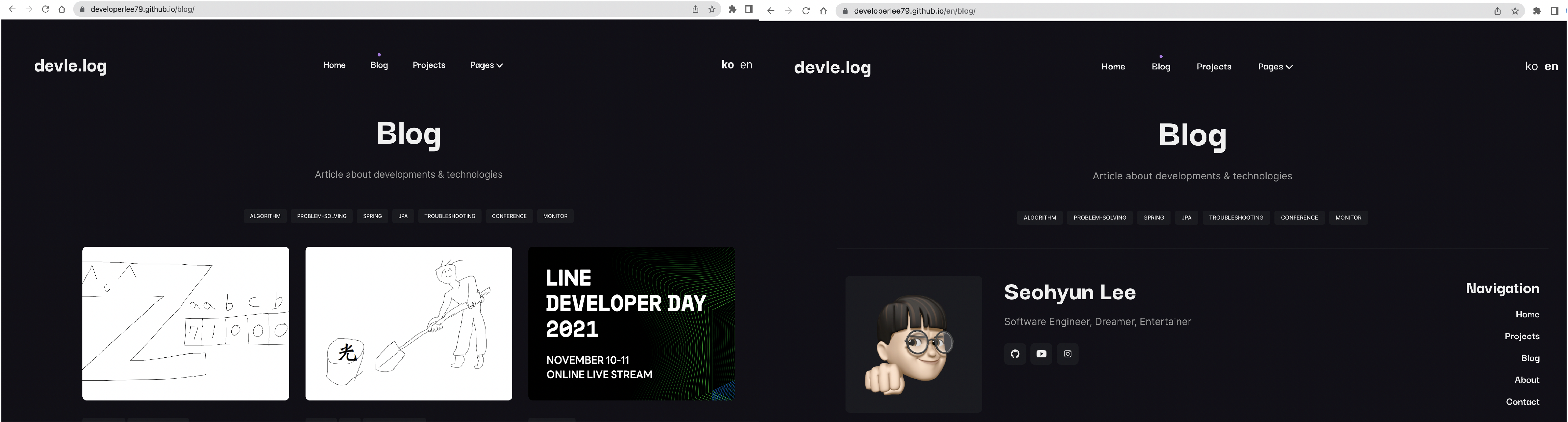
To allow language switching in the UI, register a language switch button at an appropriate location.
<ul class="nav-lang">

  {% for lang in site.languages %}
  <li id="lang" style="float: right;">
    <a style="{% if lang == site.active_lang %}font-weight: bold;{% endif %}text-align:center;" href="{% if lang == site.default_lang %} {{site.baseurl}}{{page.url}} {% else %} {{site.baseurl}}/{{ lang }}{{page.url}} {% endif %}">
      {{ lang }}
    </a>
  </li>
  {% endfor %}

</ul>
Automating GitHub Pages Deployment
GitHub blocks execution of unauthorized Jekyll plugins for security reasons. Therefore, if you host your site with GitHub Pages, you cannot use Polyglot directly. To solve this, you have to build files separately on every update and host the built output. That can be tedious and make repository management harder, but this process can be automated with GitHub Actions.
Separate the site branch for uploading source blog files from the main branch connected to GitHub Pages hosting. Then add an auto-build step action in GitHub Actions so that whenever content is added to the site branch, it automatically builds and reflects only the built output to the main branch.
name: Jekyll site CI

on:
  push:
    branches: [ "site" ]
  pull_request:
    branches: [ "site" ]

jobs:
  build:

    runs-on: ubuntu-latest

    steps:
    - uses: actions/checkout@v3
    - name: Build the site in the jekyll/builder container
      run: |
        docker run \
        -v $:/srv/jekyll -v $/_site:/srv/jekyll/_site \
        jekyll/builder:latest /bin/bash -c "chmod -R 777 /srv/jekyll && jekyll build --future"

    - name: Push
      uses: s0/git-publish-subdir-action@develop
      env:
          REPO: self
          BRANCH: main
          FOLDER: _site
          GITHUB_TOKEN: $
          MESSAGE: "Build: ({sha}) {msg}"